VideoToMP3Music

Convert Videos to MP3 Music

Easily convert any videos to MP3 so that you can play it as music. Simply, locate your video(s) and crop out parts from the beginning and end if required. The conversion is quick and is done locally on your phone.
* For your Android device

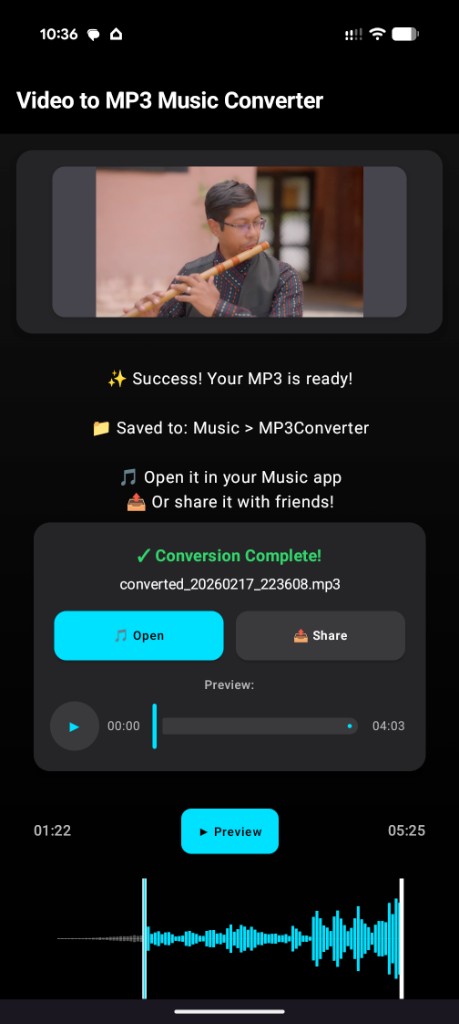
Video to MP3 Music Converter app screenshot

What You Get

High-Quality MP3 Output

The Video to MP3 conversion process is designed to produce crisp MP3s. Your audio player will love and support the format. The transformation is quick and painlesss depending on the length of your video.

Waveform + Precision Trim

View the waveform so you have an idea about when the song actually starts. Before the conversion, select the parts that you want to be cropped. The result will be a trimmed and smooth audio MP3 file.

Private by Design

You do not need to create an account or upload anything. The conversion is not done online. Your files are converted locally. So be assured that nothing leaves your device. It works completely offline as well.

FAQs

Does this app work offline?

Yes, this mobile application is meant for total offline functionality. That means, once you install this application from the Play Store, all the features are downloaded as well. After that, you can use this app freely without any internet connection. All the conversion happens locally on your phone or tablet.

Is my data uploaded anywhere?

No, nothing is uploaded. We designed this application with privacy in mind. So, nothing from your phone is uploaded to our servers. Your files stay on your device during conversion. Nothing ever leaves your system. Rest assured, our tool is only facilitates the local file translation.

What formats are supported?

All popular video formats are supported by our application. Common and popular formats include MP4 (MPEG-4), MOV (Apple QuickTime), MKV (Matroska), AVI (Audio Video Interleave), and WebM (Open Web Format).

Can I trim before converting?

Yes, you can crop out the beginning and the end before converting. We noticed that these parts usually contains unwanted bits outside of the song you need. Drag the sliders to chop off the parts you want exclude. Play back the selection just to be sure. Then make your conversion freely.

Is the app free to use?

We promise you that we developed this application without any charges. Just get it for free on the Google Play Store and it will always be freely available on your phone or tablet.